Perks at Work
- 4.8
- Rating
- 100.00K
- Installs
- Free
- Price

 Analysis by App-foxy
I approached Perks at Work as something more practical than a typical shopping app: a place to check whether my employee benefits could make ordinary purchases a little less expensive or more worthwhile. That distinction matters. The app is free, aimed at everyone from an age-rating perspective, and built around employee benefits and discounts rather than general browsing for its own sake. In my experience, that makes its value depend less on how exciting it feels on day one and more on whether I remember to open it before spending money.
Developed by Next Jump Inc., it sits in the shopping category but does not behave exactly like a conventional marketplace. I would not install it expecting a huge product catalog, a replacement for a retailer’s app, or a new social shopping routine. I would install it because my workplace gives me access to perks and I want a convenient way to look for them. The central question is simple: can it become part of my normal buying habits, or will it remain an app I open once, explore briefly, and forget?
From first-week curiosity to a useful shopping habit
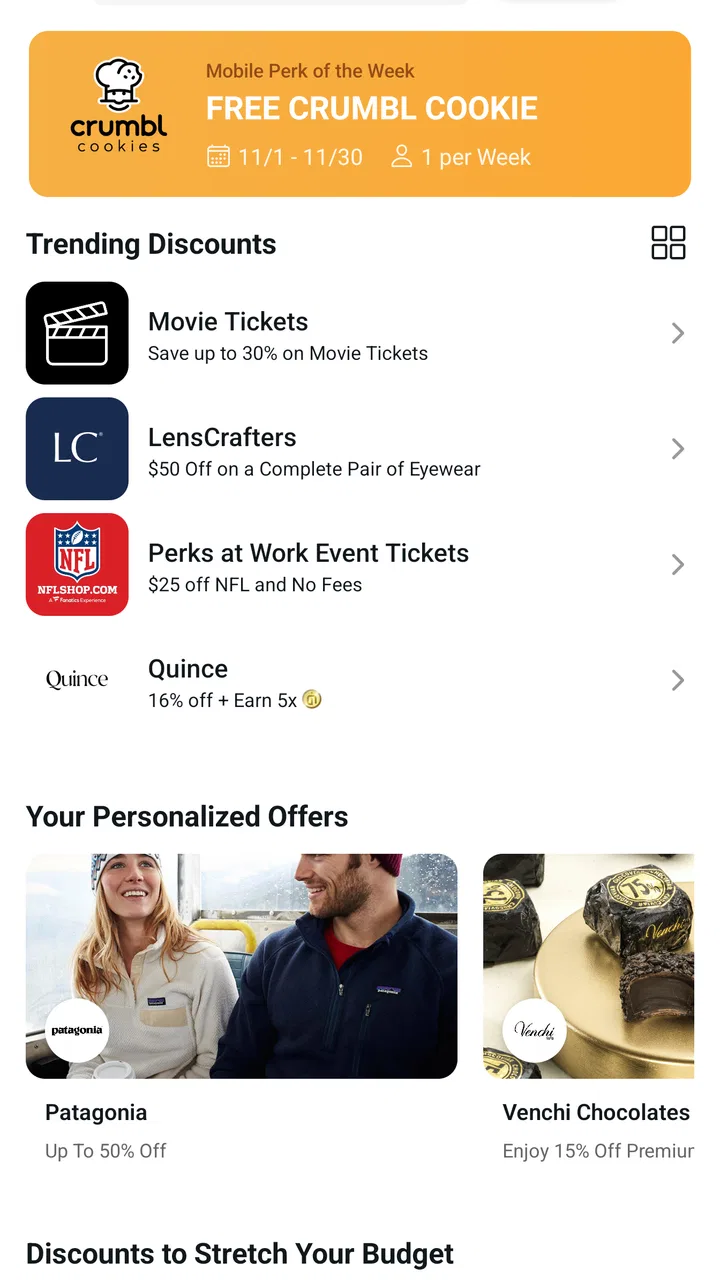
The first-week appeal comes from discovery. Employee discounts are easy to ignore when they are buried in workplace messages, benefit pages, or occasional reminders. A dedicated mobile app gives those offers a more visible home. I can browse with a specific purpose, such as checking for savings before ordering something, or I can look around when I know I have an upcoming purchase but have not decided where to make it.
You May Also Like

 Blood Strike: 2.5 Anniversary
Blood Strike’s Loadouts Turn Every Drop Into a Tactical Gamble
A close look at Blood Strike’s custom loadouts: how fast access to signature weapons reshapes its battle royale rhythm, rewards preparation, and narrows the gap between fights.

 Pandora - Music & Podcasts
Pandora’s Music Is Easy to Start, but Harder to Recover
Pandora’s strength is its low-effort path from a seed to a station. Its weak spot is how much confidence it asks you to place in connection, setup, and quiet recovery.

 8 Ball Pool
 Is Built on Rivalries, Rematches, and Routine
A close look at the rivalries, rematches, shared routines, and unanswered safety questions that turn a quick pool match into a persistent mobile community.

 Samsung Music
’s Quiet Strength Is Playing What You Already Own
Its reach comes less from spectacle than from dependable access to a personal library. That simplicity is both the app’s strongest retention engine and its ceiling.

 AccuWeather: Weather Radar
AccuWeather Review: A Quick, Clear Forecast for Everyday Decisions
For everyday plans, the best forecast is the one you can understand quickly. AccuWeather makes rain timing, radar, and local conditions easy to act on, with a few trade-offs.

 Hill Climb Racing
Why Hill Climb Racing Still Turns Crashes Into One More Run
A tiny car, a bumpy hill and one more upgrade: Hill Climb Racing keeps resurfacing because its simple chaos makes every near-miss feel personal.
More From Our News Desk
View All News


That is a more useful starting point than casually scrolling through ordinary shopping recommendations. The app has a reason to exist in my routine: it may help me find a benefit before I pay full price elsewhere. The best early experience is therefore not about spending a long time inside the app. It is about opening it, finding something relevant, understanding how the benefit works, and then using that information at the right moment.
A realistic example would be planning a birthday gift after work. Instead of immediately opening a familiar retailer, I would first check Perks at Work to see whether an eligible offer could influence where I buy. I might compare the benefit with the retailer’s normal price, delivery terms, and convenience. That extra check takes discipline, but it can prevent the common mistake of remembering a discount only after the purchase is complete.
This is where the app feels different from cashback services or coupon browsers. Those alternatives often encourage broad searching across the internet, while this product is tied to the employee-benefit context. That can make the results more personally relevant, but it also narrows the audience. If I am not connected to a participating workplace benefit arrangement, the app is unlikely to become a meaningful shopping tool for me. It is not a general-purpose bargain finder that I would recommend to every shopper.
The app’s store presence suggests a healthy level of interest, with an average rating of 4.9 from around 2.2 thousand ratings and more than 100 thousand installs. I treat those figures as encouraging rather than conclusive. A strong rating tells me that many users find the basic experience worthwhile, but it does not answer the more important personal question: whether the available employee benefits match my spending patterns. A highly rated benefit app can still feel unhelpful if its offers are irrelevant to my household.
During the first week, I would judge it by three practical tests. Can I get to useful offers without wandering through unrelated categories? Can I understand the next step without having to decode complicated conditions? And can I remember where I found an offer when I am ready to buy? These tests matter more than visual polish because the app’s purpose is to support a decision outside the app.
What makes the early experience worthwhile
The strongest early use case is planned spending. Travel, gifts, larger household purchases, and recurring services are the kinds of decisions where a small benefit may justify checking first. The weakest use case is impulse shopping. If I am already holding my phone at checkout and have only a few seconds, a benefit app may feel like an obstacle unless I have already learned where to find the relevant offer.
My advice is to explore it before you need it. I would look through the available sections, note which kinds of purchases seem relevant, and learn the path from an offer to the actual buying decision. That preparation turns the app from a directory into a shortcut. It also exposes a limitation early: the app cannot create value from benefits I would never use.
Another useful habit is to compare the final cost rather than the headline appeal of an offer. A workplace discount may be attractive, but delivery charges, restrictions, timing, or a less convenient purchasing route can change the calculation. I would use Perks at Work as a starting point for comparison, not as automatic proof that every listed option is the best deal.
Month-to-month value depends on repetition
After the novelty fades, the app has to earn a place on my phone through recurring usefulness. I would not expect to open it every day. That would be an unreasonable standard for a benefits app. Instead, its long-term value should come from appearing at the right points in a normal month: before a planned purchase, when a seasonal expense arrives, or when I remember that my employer offers more than the benefits I usually use.
This creates a useful distinction between discovery value and maintenance value. Discovery value is the pleasant surprise of finding something I did not know I could access. Maintenance value is the quieter benefit of remembering to check before spending. The second is what determines whether I keep the app installed. If I repeatedly find relevant options, it becomes a small financial checkpoint. If every visit produces nothing connected to my needs, it becomes digital clutter.
I would build the app into a simple three-step routine. First, identify an upcoming purchase. Second, check Perks at Work before choosing the retailer or service. Third, record the practical result in my own mind: did the benefit save money, improve convenience, or make no meaningful difference? This prevents vague optimism. After a few months, I can tell whether the app is actually helping or whether I am opening it out of habit without acting on what I find.
That workflow is one of the less obvious strengths of this type of product. The app does not need to replace my shopping tools to be valuable. It can sit before them as a screening step. I might still complete the purchase through a retailer’s app because that retailer handles delivery, account history, or returns better. Perks at Work can remain useful even when it is not the final destination.
At the same time, the month-to-month experience may be uneven. Employee benefits are not necessarily aligned with my calendar. One month I may have a reason to browse; another month I may have no planned purchase that fits. That is not automatically a flaw, but it means I should not judge the app by daily engagement. Its role is closer to a reference tool than an entertainment feed.
The current release is version 2.4.62, and the app was released on March 31, 2025. I see the version information as useful when checking compatibility or deciding whether an update is available, especially because the minimum operating-system requirement is Android 7.0. For someone using an older phone, that requirement is worth checking before relying on the app for a time-sensitive purchase. For most supported Android users, the more important issue will be whether the app remains convenient enough to revisit.
The app is free, which lowers the cost of experimenting with it. That does not mean it is cost-free in practice: my time still matters, and an unnecessary search can erase the benefit of a small discount. I would keep using it only when the likely value exceeds the effort of checking. This is especially important for low-cost purchases, where a quick familiar retailer may be the better choice.
Who is likely to keep using it
I think it suits employees who already plan purchases carefully and enjoy checking available benefits before committing. It can also help households where one person manages recurring spending and wants a single place to remember workplace perks. People who make occasional larger purchases may find it more useful than people who shop impulsively every day.
I would be more cautious recommending it to someone who expects a universal coupon engine, instant savings on every order, or a fully personalized shopping assistant. Those expectations point toward a different category of service. Perks at Work makes more sense when the employee-benefit connection is the reason for opening it.
It is also not the right choice for someone who dislikes adding an extra step to shopping. If I already know which retailer I want, value fast checkout above all else, and rarely compare prices, the app may interrupt rather than improve my routine. In that situation, a retailer app or a straightforward price-comparison tool could be more efficient.
Maintenance is light, but attention is the real cost
The physical maintenance burden appears modest: it is a free shopping app with a focused purpose, not a tool that demands constant content creation or daily management. The larger burden is remembering to use it. Benefits have no value if I forget them, and a discount discovered after checkout is functionally useless for that purchase.
I would give the app a defined place in my routine rather than relying on random reminders. For example, I could check it when planning a larger purchase or reviewing monthly expenses. That approach avoids opening it repeatedly without a reason. It also gives me a fair test of recurring value: after several planned checks, I can decide whether it deserves permanent space on my home screen.
There is a second maintenance issue: keeping expectations realistic. Discounts and employee perks can change in usefulness as my needs change. An offer that matters during a move, a holiday period, or a family event may be irrelevant later. I would periodically reassess the app based on actual use instead of assuming that a strong first impression guarantees lasting value.
The app’s Everyone content rating makes it approachable for a broad audience, but that does not remove the need for sensible shopping judgment. I would still read the conditions attached to any benefit, confirm the final purchase details, and avoid treating a workplace discount as a substitute for checking quality, returns, or delivery arrangements. The app can point me toward an option; it cannot make every surrounding decision for me.
One practical tip is to separate “interesting” from “actionable.” During browsing, I may see benefits that sound appealing but do not fit anything I need. I would save my attention for offers connected to a real purchase, then compare the complete transaction. This reduces fatigue and makes the app feel less like another stream of promotions.
Another tip is to check before choosing a seller, not after. Once I have selected a retailer, filled a basket, and started checkout, I am less willing to change course. Checking earlier gives the benefit a genuine chance to influence the decision. It also makes the app complement ordinary shopping rather than compete with it.
Where long-term fatigue can appear
The main source of fatigue is repetition without relevance. If I open the app and repeatedly see benefits that do not match my needs, the act of checking becomes a chore. The problem is not necessarily that the app lacks offers; it is that the offers may not arrive at the moment I need them. A benefits catalog can be broad and still feel narrow from one user’s point of view.
Another source is comparison friction. I may need to move between the benefit information and a retailer’s own app or website to understand the real value. That is reasonable for a meaningful purchase, but excessive for a small one. If the process takes too long, I will naturally return to the familiar alternative, even when Perks at Work might have saved a little money.
There is also a psychological trap: confusing a discount with a saving. If I buy something only because a benefit is available, I may spend more than I intended. I would use the app to reduce the cost of purchases already planned, not to justify purchases I would otherwise skip. That rule is important for keeping the app financially useful rather than turning it into a source of temptation.
Compared with ordinary coupon apps, the employee-benefit focus can make the experience feel more purposeful, but it may also offer less breadth for a particular shopping mission. Compared with cashback services, the value may be more immediate or easier to understand in some situations, while cashback tools can be better for shoppers who want rewards across many unrelated purchases. Compared with retailer apps, Perks at Work is better positioned for discovery and comparison, but the retailer app will usually remain the more natural place for order tracking and post-purchase support.
That trade-off explains why I would not make it my only shopping app. I would use it as a benefit checkpoint, then move to the service that handles the actual purchase best. Its long-term role is complementary. Expecting it to replace every other shopping tool would create disappointment that the product does not need to cause.
Fatigue can also come from installing an app without establishing a personal reason to return. I would decide in advance what qualifies as a useful result: a lower total cost, access to a benefit I would otherwise miss, or a better option for a planned expense. If a visit does not produce one of those outcomes over time, uninstalling it would be reasonable. Free storage does not make an unused app valuable.
My long-term verdict
Perks at Work earns lasting space on my phone when I treat it as a pre-purchase habit rather than a destination for casual browsing. Its strongest quality is focus: it connects shopping with employee benefits and discounts, giving me a reason to check before I spend. The free price makes trying it easy, and the strong 4.9 average from roughly 2.2 thousand ratings suggests that the basic proposition is resonating with many users.
My recommendation is conditional but positive. If my workplace benefits are relevant to the things I buy and I am willing to add one quick check before planned purchases, I would keep using it. The app can quietly save effort or money over time without demanding daily attention. Its value is cumulative, built from several sensible decisions rather than one dramatic first impression.
I would skip it if I am looking for universal coupons, instant rewards on every transaction, or a shopping app that handles the entire journey from discovery to returns. A conventional retailer app, price-comparison service, or cashback alternative may fit those needs better. I would also avoid keeping it merely because the rating is impressive; personal relevance matters more than popularity.
After the first week, the excitement will probably settle. That is not a weakness by itself. This is the kind of app that should become boring in a good way: something I remember before a purchase, consult quickly, and close when I have the information I need. If it becomes part of that routine, it has earned its place. If I cannot connect it to real spending decisions, the novelty will fade and so will the reason to keep it.
Overall, I see Perks at Work as a practical companion for employees who want to make better use of available shopping benefits. It is not a universal answer to saving money, and it does not remove the need to compare the final deal. But used with a clear workflow—check early, compare the complete cost, and buy only what I already need—it has a credible chance of delivering recurring value long after the initial curiosity disappears.
FAQs for Perks at Work
01What is Perks at Work and how does it benefit employees?
Perks at Work is a comprehensive employee benefits platform designed to enhance workplace satisfaction by offering exclusive discounts, rewards, and perks. Employees can access deals on products, travel, wellness services, and more. The platform aims to improve employee well-being and motivation by providing cost-saving opportunities and unique experiences, making it a valuable addition to any company's benefits package.
02How do I access and use the Perks at Work platform?
To access Perks at Work, employees must first register using their work email address or a unique company code provided by their HR department. Once registered, users can log in via the website or mobile app. The platform is user-friendly, featuring easy navigation to browse various categories and claim available offers. Simply select a perk and follow the instructions to redeem.
03Are there any costs associated with using Perks at Work?
Using the Perks at Work platform is typically free for employees, as the service is provided by their employer. However, while accessing the platform is free, purchasing items or services from third-party providers might incur costs. The discounts and perks are designed to offer savings, but users should review the terms of each offer to understand any potential expenses.
04Is my personal information secure on Perks at Work?
Yes, Perks at Work prioritizes user privacy and data security. The platform employs advanced encryption and security measures to protect personal and financial information. Employees can feel confident that their data is safe, as the platform adheres to industry standards for data protection. Users should also follow best practices, such as using strong passwords and keeping login credentials private.
05What types of perks and discounts are available on Perks at Work?
Perks at Work offers a wide range of perks and discounts across various categories, including travel, electronics, dining, entertainment, and wellness. Users can find offers on hotel bookings, tech gadgets, gym memberships, movie tickets, and more. The platform regularly updates its offerings, ensuring employees have access to the latest deals and exclusive promotions tailored to their interests.
Pros
- Easy navigation with a user-friendly interface.
- Wide variety of discounts across categories.
- Exclusive offers for members only.
- Seamless integration with existing accounts.
- Responsive customer support team.
Cons
- Limited availability in some regions.
- Occasional app crashes reported.
- Discounts vary by location.
- Requires account setup to access offers.
- Notifications can be overwhelming.

Perks at Work
Gallery